Oddseal guide · Commercial invoice
How to redact a commercial invoice for a non-customs recipient
Redact a commercial invoice only when you are preparing a separate copy for a recipient who does not need the full customs, payment, banking, or insurance record. Review party identities, unit prices, bank details, contacts, and references, while preserving the transaction facts required for the copy's stated purpose.
Oddseal editorial · Published August 22, 2026 · Updated September 28, 2026
Oddseal is responsible for this guide and its synthetic examples. Document requirements are linked to the sources below; product claims describe their stated scope. Report an error or suggest a correction.
Why is a commercial invoice sensitive?
A commercial invoice joins commercial, customs, payment, and logistics data in one record. It can identify the seller and buyer, describe the goods, state origin and value, show unit pricing and discounts, and carry remittance instructions. Those facts may expose a supplier relationship or margin, but many are also required to clear, pay, finance, insure, or audit the shipment.
For U.S. imports, 19 CFR 141.86 lists invoice contents such as seller and buyer information, detailed merchandise description, quantity, purchase price or value, currency, itemized charges, country of origin, and a responsible exporter employee. That is why a customs invoice should remain complete. Redaction belongs on a separate copy prepared for a different purpose.
Worked example · entirely synthetic
A commercial invoice for a limited review
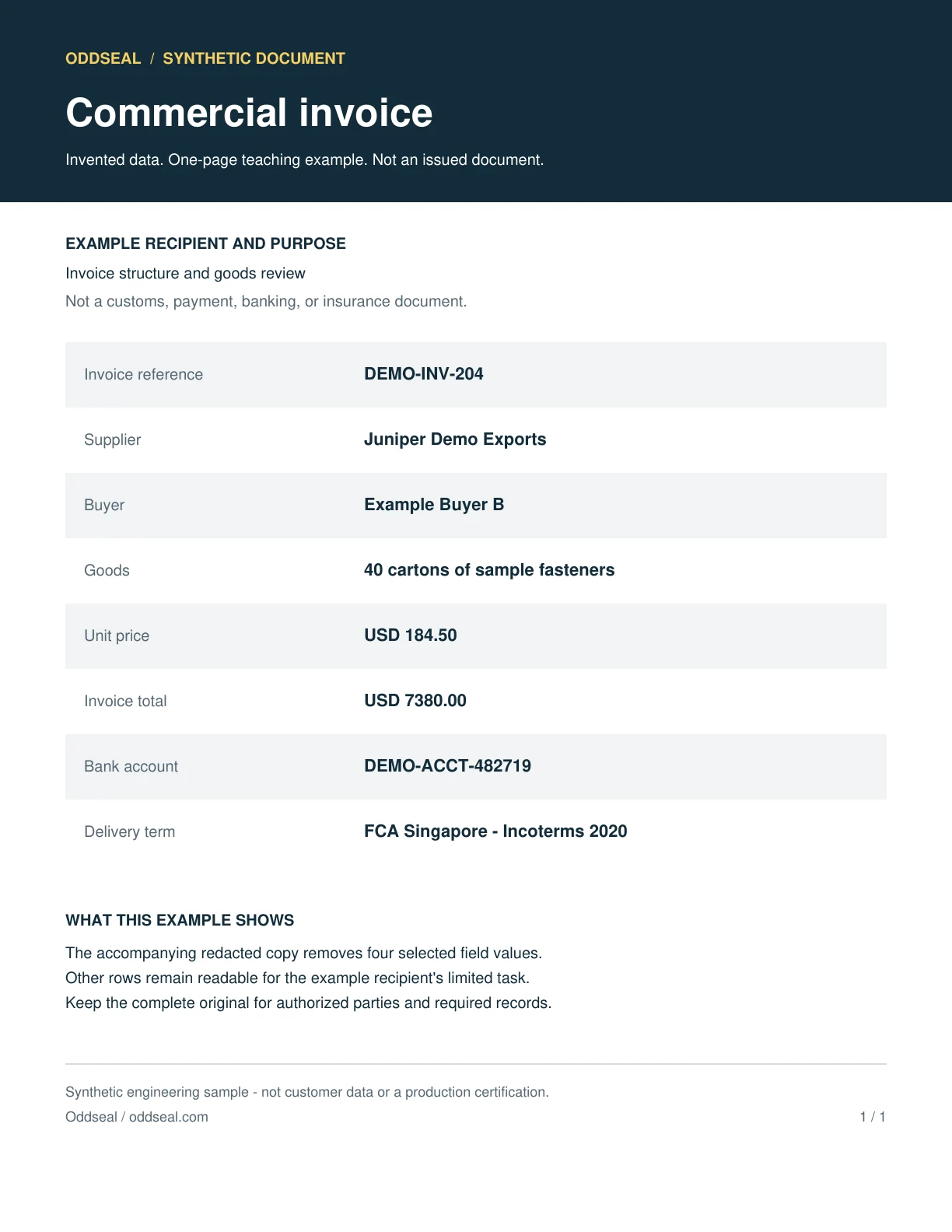
An outside reviewer needs to see the invoice structure and goods, but does not need the supplier, pricing, or bank account. This invented example keeps the buyer and invoice reference visible. Those choices would be wrong for a sample meant to hide every party and must be reconsidered for each recipient.
Source example
Redacted example
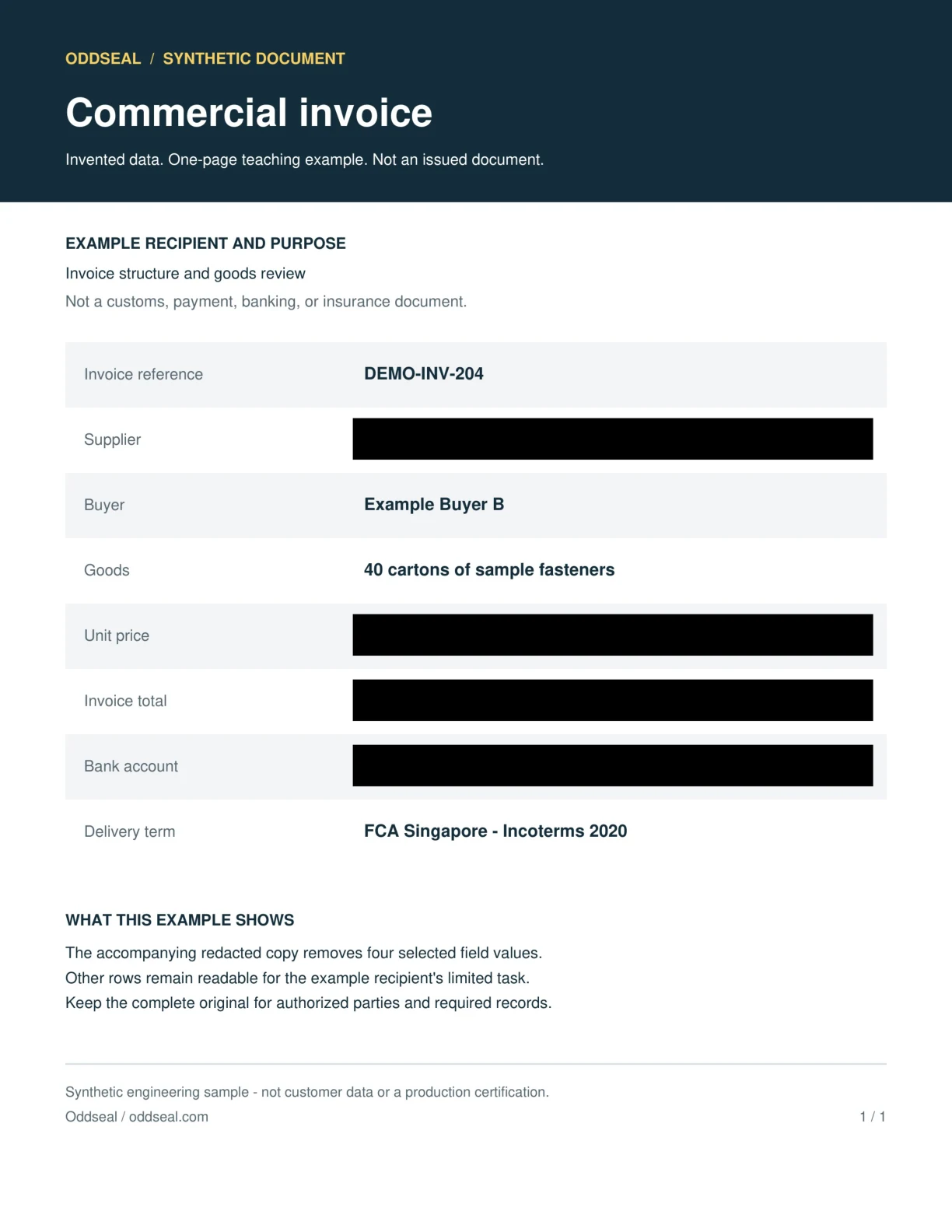
- Removed in this example
- Supplier · Unit price · Invoice total · Bank account
- Kept visible for this recipient
- Invoice reference · Buyer · Goods · Delivery term
The sample was generated and checked locally with Oddseal’s engine using four manually selected regions. The redacted PDF was built the same way as in the product: each page rendered to a fresh 240-DPI image with the masks burned in. The evidence download records file hashes, versions, and the checks run.
Those local checks include page-level comparisons from Oddseal’s offline test profile that the product does not run on every document. Before sharing, the product runs a narrower check: an independent readback of the stored file plus a structural check.
The output samples are image-only PDFs with no searchable text layer. An empty text search is expected and cannot establish that a visible region was removed. Compare the page images and read the check evidence.
This is engine-level evidence for invented examples. It does not test automated detection, a production account, the application’s release checks, or share links. It is not a claim that every sensitive detail was found.
Which commercial invoice fields deserve review?
Separate commercial sensitivity from document necessity. A field can be sensitive and still be required on the operative invoice.
Seller, manufacturer, buyer, and consignee
Party names, addresses, tax numbers, and logos can reveal the supply chain. Customs, payment, and delivery workflows often rely on these exact identities.
Reference: 19 CFR 141.86, contents of invoices and general requirements
Unit price, total value, discounts, and currency
Pricing can expose negotiated terms or margin. It is also central to customs valuation, payment approval, financing, and insurance.
Reference: 19 CFR 141.86, contents of invoices and general requirements
Freight, insurance, commission, and packing charges
Itemized charges can reveal commercial structure. They may also be required to explain the customs value or the amount due.
Reference: 19 CFR 141.86, contents of invoices and general requirements
Bank and remittance instructions
Account numbers, IBANs, SWIFT codes, beneficiary details, and payment references should reach only people involved in payment or reconciliation.
Product description, quantity, origin, and classification
Product and classification facts may identify a supplier or trade lane, but customs and receiving workflows need accurate, complete data.
Reference: 19 CFR 141.86, contents of invoices and general requirements
Purchase orders, invoice numbers, contacts, and signatures
References and personal details can reconnect a redacted copy to internal systems or individuals. Keep what the recipient needs to validate the copy.
Reference: 19 CFR 141.86, contents of invoices and general requirements
What should stay visible on an invoice copy?
Use the intended action to decide. A person paying or clearing an invoice needs a different record from someone reviewing a sample transaction.
Customs broker or customs authority
- Keep visible
- Send the complete invoice and attachments required for the entry, including identities, descriptions, quantities, values, origin, and charges.
- Review before sharing
- Do not replace the customs invoice with a redacted derivative unless the authority gives a specific instruction that permits it.
Buyer, accounts payable, bank, or insurer
- Keep visible
- Keep the parties, invoice references, goods, amounts, currency, terms, and payment or insurance details needed to process the transaction.
- Review before sharing
- Review unrelated personal contacts, internal annotations, and bank details that do not belong in that recipient's workflow.
Tender, prospect, or diligence reviewer
- Keep visible
- Keep dates, document structure, general product context, and enough value evidence to support the review purpose.
- Review before sharing
- Review party names, exact unit prices, account details, signatures, invoice numbers, purchase orders, and unique product references.
Operational subcontractor
- Keep visible
- Keep the cargo description, quantity, handling facts, locations, and references required for its assigned work.
- Review before sharing
- Review pricing, payment instructions, unrelated counterparties, and buyer-seller terms outside that work.
How to redact a commercial invoice copy
Start with a duplicate for the limited disclosure. Never overwrite the customs or accounting record.
- 01
Classify the recipient
Determine whether the copy supports customs, payment, banking, insurance, operations, or a non-operative commercial review.
- 02
List required invoice facts
Write down the parties, values, goods, charges, references, and payment facts the recipient must see before choosing redactions.
- 03
Review the invoice and attachments
Check every page, packing detail, continuation sheet, footer, stamp, signature, and remittance block. The same price or party may recur.
- 04
Check totals and meaning
Make sure the remaining subtotals, taxes, quantities, currency, and labels still make sense. A partial number can misstate the transaction even when it reveals nothing sensitive.
- 05
Create a permanent derivative
Remove the approved targets from a new PDF instead of hiding live text with annotations, highlights, or shapes.
- 06
Check and label the copy
Open the output, confirm each selected value is covered, and compare the remaining totals and labels with the source. Label the result for its limited purpose and keep the complete invoice in the system of record.
What does Oddseal check on an invoice copy?
Oddseal applies the human-approved plan to a new PDF and checks the stored file before allowing it to be downloaded or shared.
What the check covers
- Selected names, prices, account details, and references are burned into black masks on a fresh 240-DPI page image. The output keeps no text layer, fonts, metadata, or attachments from the source invoice.
- Before download or sharing, an independent reader opens the stored file and confirms the expected page count, no extractable text, and no attachments, JavaScript, or open action, alongside a structural check of the file.
What it does not cover
- It does not check that every value you meant to remove was selected. A value you leave unselected stays visible in the image.
- It does not compare every unmasked line with the source at runtime. Open the output and confirm the totals, goods, and labels you kept are readable.
- It does not make the derivative satisfy customs, tax, banking, payment, insurance, or accounting requirements, or show that suggestions found every sensitive field.
Sources and evidence
These sources explain the document requirements, redaction methods, or example checks cited in this guide. Requirements vary by document, route, contract, and jurisdiction. A linked proposal is background, not an operative rule.
U.S. Customs and Border Protection via eCFR
19 CFR 141.86, contents of invoices and general requirements
Lists the invoice information required for imported merchandise in the United States.
Information Commissioner's Office
Disclosing documents to the public securely
Explains permanent redaction, hidden-information risks, and disclosure checks for electronic documents.
Federal Maritime Commission
Ocean Transportation Intermediaries
Explains the documentation work and regulated roles of ocean freight forwarders and NVOCCs.
Related reading
Check a redacted freight PDF
Test the output yourself and see what Oddseal's pre-share check covers.
Why black-box redaction fails
See how drawn boxes leave text behind and how to test a PDF for it.
Freight document redaction guide
Use a recipient-first workflow across freight document families.
Redact a rate confirmation
Separate customer-facing commercial terms from the carrier agreement.
Redacted freight contracts
Prepare transaction evidence for a tender, reference, or diligence review.
Start on Oddseal’s Free plan: 5 documents a month, no card needed.