Oddseal guide · Scanned freight documents
How to redact a scanned freight PDF when text search misses a field
On a scanned freight PDF, the words you see may be pixels rather than selectable text. Review the page image as well as OCR suggestions, mark every occurrence that should be removed, and check the exported PDF. A search with no results is not enough to establish that the visible detail is gone.
Oddseal editorial · Published September 9, 2026 · Updated September 28, 2026
Oddseal is responsible for this guide and its synthetic examples. Document requirements are linked to the sources below; product claims describe their stated scope. Report an error or suggest a correction.
Start by checking what kind of PDF you have
Try selecting a line and searching for a clearly printed word. If neither works, the page may be image-only. If selection works but the copied words are wrong, the PDF may contain an inaccurate OCR text layer. A mixed PDF can contain both kinds of page, so check more than the first page.
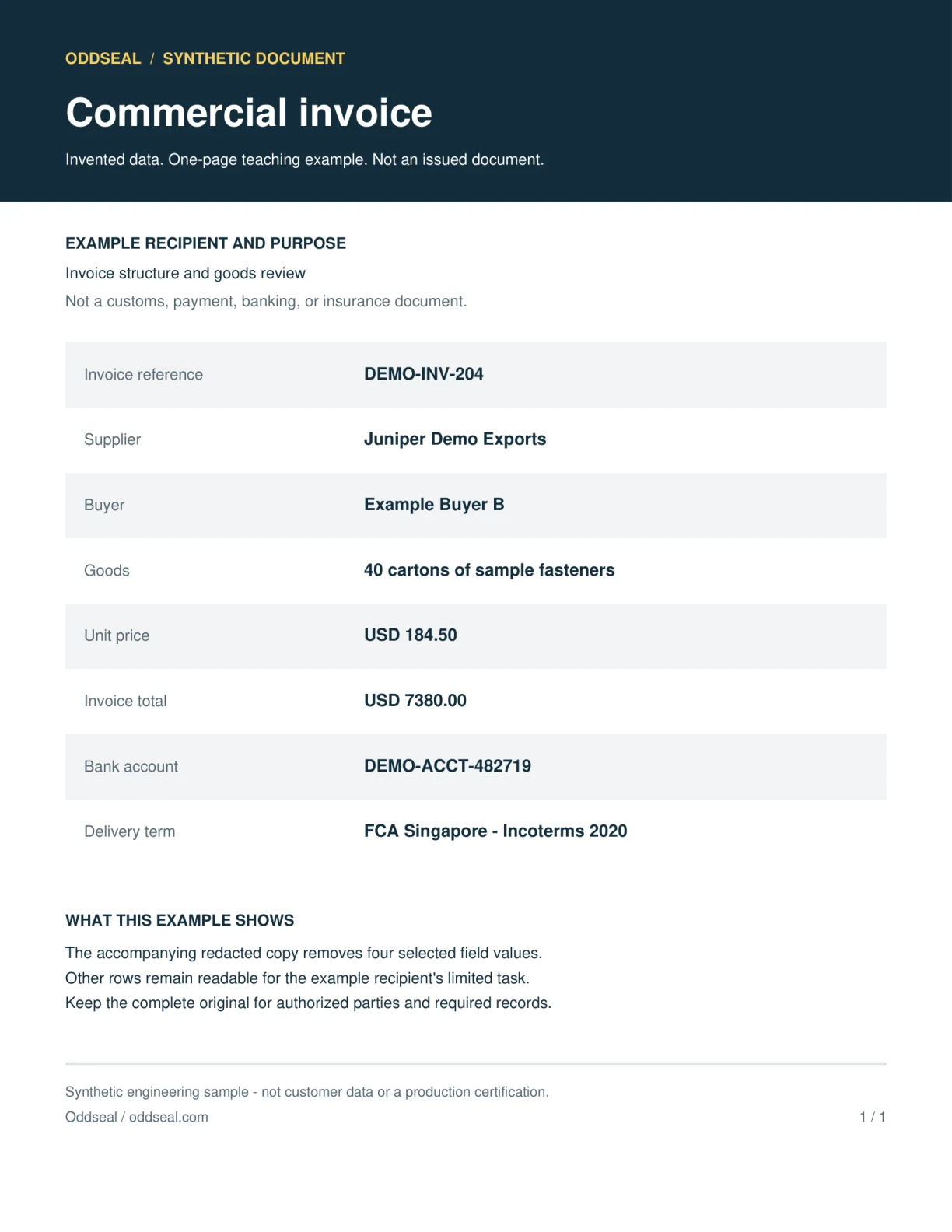
The worked example is a synthetic commercial invoice rendered into an image-only PDF. It is a controlled demonstration, not a customer document or a benchmark of noisy scans, handwriting, stamps, or every freight layout. Its visible supplier and payment fields give you specific regions to compare before and after redaction.
Worked example · entirely synthetic
The same invoice as an image-only scan
This source is the invented invoice rendered into an image-only PDF at 200 DPI. The selected fields are unchanged. It demonstrates why a visible supplier name needs a page-region check even when text search cannot find it; it is not a test of degraded scans or handwriting.
Source example
Redacted example
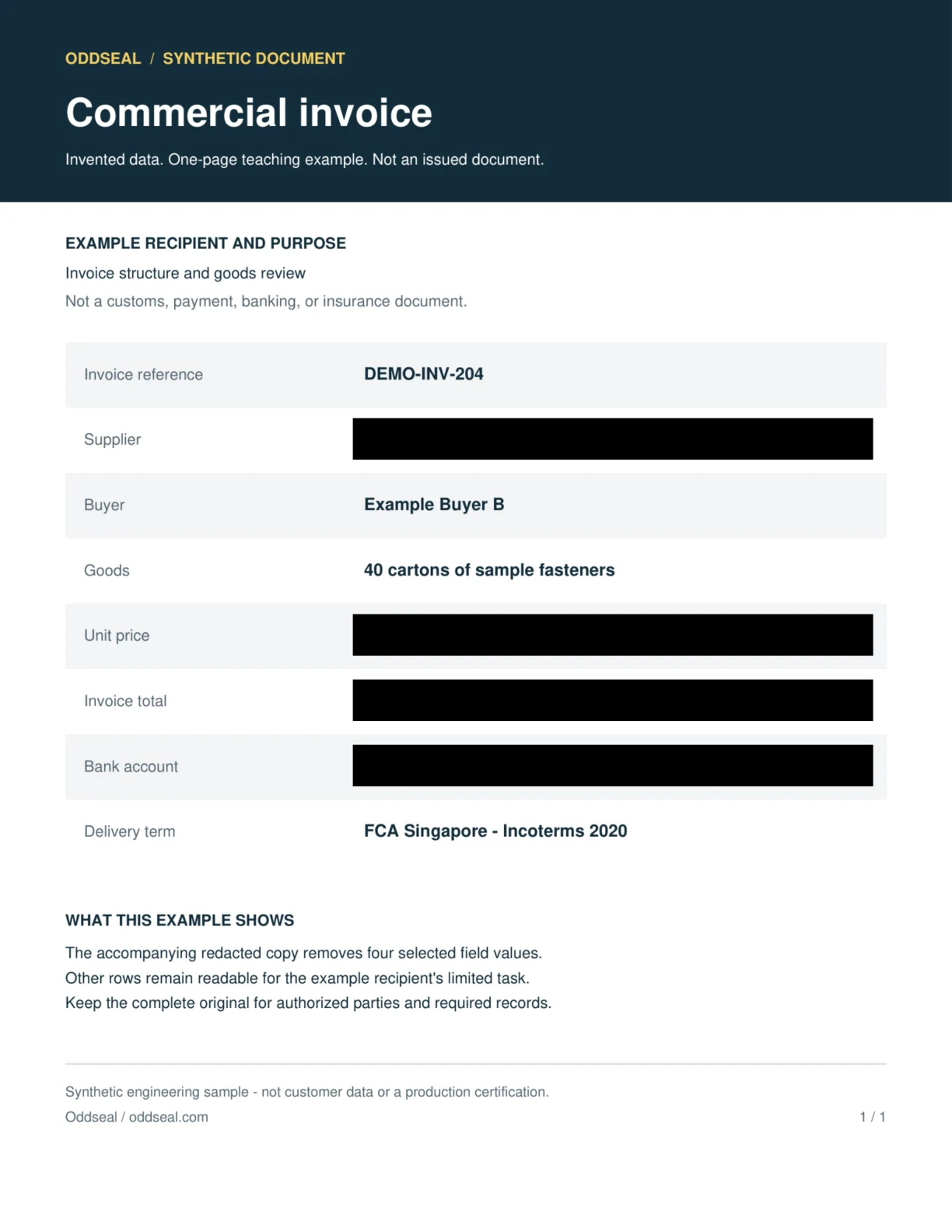
- Removed in this example
- Supplier · Unit price · Invoice total · Bank account
- Kept visible for this recipient
- Invoice reference · Buyer · Goods · Delivery term
The sample was generated and checked locally with Oddseal’s engine using four manually selected regions. The redacted PDF was built the same way as in the product: each page rendered to a fresh 240-DPI image with the masks burned in. The evidence download records file hashes, versions, and the checks run.
Those local checks include page-level comparisons from Oddseal’s offline test profile that the product does not run on every document. Before sharing, the product runs a narrower check: an independent readback of the stored file plus a structural check.
The output samples are image-only PDFs with no searchable text layer. An empty text search is expected and cannot establish that a visible region was removed. Compare the page images and read the check evidence.
This is engine-level evidence for invented examples. It does not test automated detection, a production account, the application’s release checks, or share links. It is not a claim that every sensitive detail was found.
Review the image, the text, and repeated details
Use OCR as a way to find candidates. The reviewer still decides which details belong in this recipient’s copy.
Visible words without searchable text
A supplier name can remain plainly visible in an image even when search finds nothing. Inspect the rendered page and mark the actual area occupied by the name.
OCR mistakes in prices and references
Confusable characters, decimal marks, and split words can prevent an exact search match. Compare the visible value with any extracted text before relying on a suggestion.
Names repeated in other regions
Check the heading, seller block, bank beneficiary, footer, and signatures. Selecting the first occurrence does not establish that all occurrences have been found.
Logos, stamps, and handwritten additions
Not every identifying mark is text. Inspect page regions manually; this clean synthetic example does not qualify handwriting or stamp recognition.
Skewed pages and tight table cells
Check that each approved box covers the entire target without taking a nearby amount, label, or cargo detail with it. Do this on the output as well as the source.
The OCR layer in the exported PDF
Removing pixels alone or changing a text layer alone can leave another representation behind. Use actual redaction, then inspect both the page image and any available text. Oddseal output has no text layer at all, so the page image is the whole document.
A scan does not change who needs the information
Decide the disclosure purpose before marking the page. The sample is an illustration of a limited commercial copy.
Prospect reviewing an invoice example
- Keep visible
- Keep the document labels and the product or service context needed to understand the example.
- Review before sharing
- Review supplier identity, bank instructions, contacts, and precise references that are not needed for that purpose.
Person clearing or paying the shipment
- Keep visible
- Use the complete accepted customs or payment record with the fields required for that task.
- Review before sharing
- Do not replace it with the limited sample-style copy shown here.
Work through the scanned invoice
Use the worked example’s source and redacted downloads to compare the same page. The public samples contain invented data.
- 01
Open the source PDF
Inspect the supplier and payment blocks visually. Try search and selection, then note why an empty search result on an image-only page says little about what a recipient can see.
- 02
Choose the recipient and required fields
List the labels, goods, and transaction context that must remain visible. Review the sample’s selected and retained fields before using it as a model for your own decision.
- 03
Inspect all target regions
Check the full shape of each printed value and any repeated occurrence. In a real document, examine every page and add manual selections where OCR has missed a region.
- 04
Produce a separate redacted PDF
Keep the source record. Apply the approved redactions to a new copy with a redaction tool rather than drawing annotations over the scan.
- 05
Open and compare the downloaded output
Check that the selected regions are blanked and adjacent labels remain legible. Repeat text extraction if the output contains a searchable layer.
- 06
Read the evidence boundary
The downloadable example record describes local engine checks on these exact files. It does not establish that detection found every secret or that the production upload-and-share flow ran.
What the scanned example can establish
Match any reported check to the exact source and output. Treat the image-only sample as a specific example, not a recognition-accuracy result.
What the check covers
- The before/after pages let you inspect the selected regions and the neighboring content in this synthetic sample.
- The evidence file identifies the local checks actually run and the exact files they apply to.
- In the product, the output is rebuilt the same way: each page becomes a fresh image with the masks burned in, and an independent readback of the stored file must pass before sharing.
What it does not cover
- It does not measure OCR recall on customer scans, low-resolution faxes, handwriting, or bilingual document sets.
- It does not establish complete sensitive-data detection, legal suitability, or a successful production account workflow. A value nobody selected stays visible.
Sources and evidence
These sources explain the document requirements, redaction methods, or example checks cited in this guide. Requirements vary by document, route, contract, and jurisdiction. A linked proposal is background, not an operative rule.
Information Commissioner's Office
Disclosing documents to the public securely
Guidance on permanent redaction and checking hidden information before electronic disclosure.
Adobe
Redact images in PDFs
Documents image-area redaction and the separate option to sanitize hidden information in Acrobat.
Oddseal
Synthetic scanned-invoice example evidence
Local generation and check evidence for the downloadable synthetic files; not production certification.
Related reading
Why black-box redaction fails
See how drawn boxes leave text behind and how to test a PDF for it.
Redact a commercial invoice
Choose invoice fields by recipient before making selections.
Check a redacted freight PDF
Check text, page images, and file structure on the output you will send.
Freight document redaction guide
Plan a separate disclosure copy for the recipient.
Start on Oddseal’s Free plan: 5 documents a month, no card needed.