Oddseal guide · Checking redacted PDFs
How to check a redacted freight PDF before sharing it
Check the file you will actually send. Open it independently, try to copy and search text, inspect every selected region, look for hidden content, and compare the information that should remain. These checks answer different questions. None can establish that you selected every sensitive detail in the first place.
Oddseal editorial · Published September 9, 2026 · Updated September 28, 2026
Oddseal is responsible for this guide and its synthetic examples. Document requirements are linked to the sources below; product claims describe their stated scope. Report an error or suggest a correction.
A black rectangle is not evidence of permanent removal
A rectangle drawn over a PDF can obscure the page while leaving its text recoverable. Genuine redaction removes selected content from the output. Professional redaction tools can do this; the right question is what was selected, what was removed, and which checks were performed on the final file.
Oddseal does not edit the source PDF. It renders every page to a fresh 240-DPI image, burns the approved masks into the pixels, and builds a brand-new PDF with one image per page. That output has no text layer, fonts, hidden text, attachments, annotations, JavaScript, or source metadata, so there is nothing under a mask to copy, search, or uncover. Before anyone can download or share it, an independent reader opens the stored file and confirms the expected page count, no extractable text, and no attachments, JavaScript, or open action, together with a structural check of the file. If that check fails, download and sharing stay locked.
That check confirms how the file was built. It does not search the output for each value you selected or compare the unmasked parts of every page with the source, and it cannot tell you whether you selected everything that should be removed. Those questions belong to the reviewer, which is why the checks below still matter.
The worked invoice example is entirely synthetic. The source, redacted output, previews, and evidence record are available without an account. The evidence describes local engine checks; it does not claim that a production user uploaded, reviewed, or shared this file through Oddseal.
Worked example · entirely synthetic
A commercial invoice for a limited review
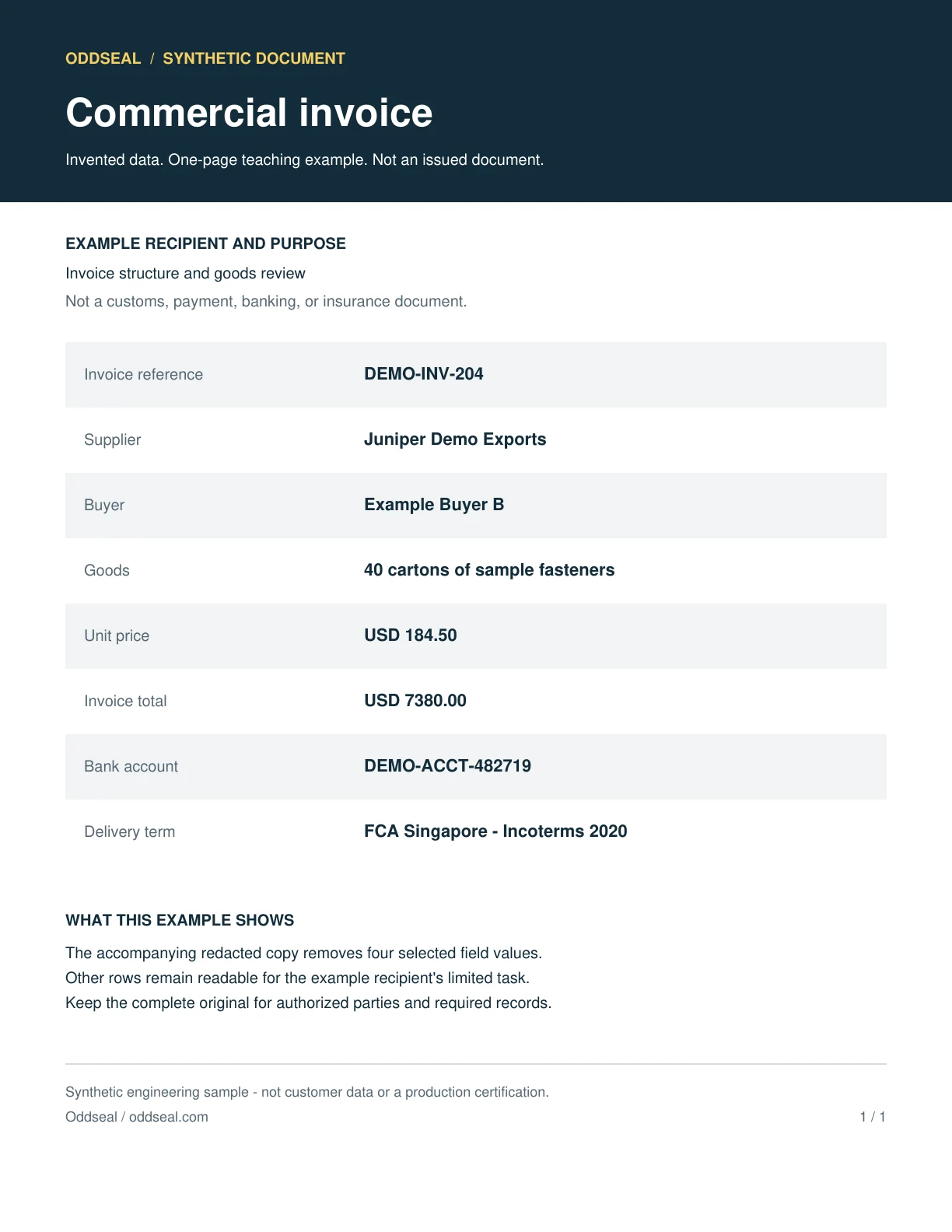
An outside reviewer needs to see the invoice structure and goods, but does not need the supplier, pricing, or bank account. This invented example keeps the buyer and invoice reference visible. Those choices would be wrong for a sample meant to hide every party and must be reconsidered for each recipient.
Source example
Redacted example
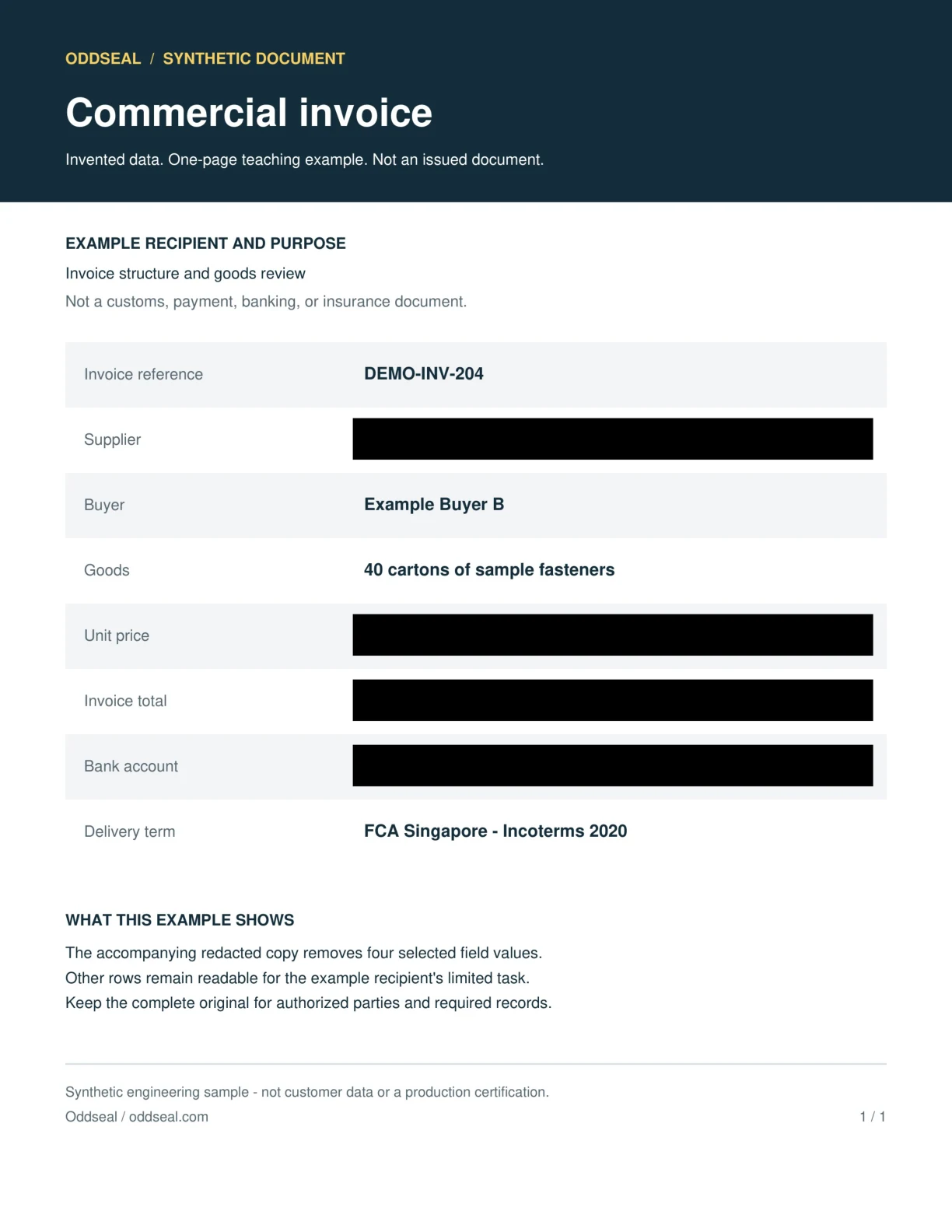
- Removed in this example
- Supplier · Unit price · Invoice total · Bank account
- Kept visible for this recipient
- Invoice reference · Buyer · Goods · Delivery term
The sample was generated and checked locally with Oddseal’s engine using four manually selected regions. The redacted PDF was built the same way as in the product: each page rendered to a fresh 240-DPI image with the masks burned in. The evidence download records file hashes, versions, and the checks run.
Those local checks include page-level comparisons from Oddseal’s offline test profile that the product does not run on every document. Before sharing, the product runs a narrower check: an independent readback of the stored file plus a structural check.
The output samples are image-only PDFs with no searchable text layer. An empty text search is expected and cannot establish that a visible region was removed. Compare the page images and read the check evidence.
This is engine-level evidence for invented examples. It does not test automated detection, a production account, the application’s release checks, or share links. It is not a claim that every sensitive detail was found.
Check the output and the decisions behind it
A successful check only answers its own question. Keep the approved selection plan beside the final PDF.
Selected text
Select all, copy, and paste into a plain-text editor, then search for the selected values. A found value needs investigation. No match is insufficient by itself: image-only text or an OCR error may still be visible.
Selected page regions
Render the final file and inspect the whole target area, including edges, partial characters, logos, and repeats. An image preview alone says nothing about hidden objects in the PDF.
Hidden information and structure
Inspect attachments, comments, metadata, layers, bookmarks, and form fields using an appropriate PDF tool. Ordinary visual inspection does not enumerate the document’s object structure.
Content that should remain
Compare the source and output outside the approved regions. Cargo descriptions, dates, quantities, labels, and agreed amounts must stay readable and mean the same thing.
The exact file being shared
Apply checks to the final saved PDF. An edited selection, different export, or replaced file needs its own checks; a result for an earlier file is not transferable.
The limits of the disclosure decision
Review whether every sensitive detail was selected and whether the recipient accepts the copy. An output check cannot make those decisions for you.
Separate the reviewer’s decision from the file checks
Both matter, but one cannot replace the other.
Reviewer choosing the redactions
- Keep visible
- Keep the information the recipient needs to act on or assess the document.
- Review before sharing
- Inspect every page for sensitive fields, repetitions, and identifying context. Automated suggestions may be incomplete, so draw boxes for anything they missed.
Operator checking the final output
- Keep visible
- Keep a clear association between the reviewed source, approved selections, final output, and check results.
- Review before sharing
- Investigate failed or missing checks. Do not present a partial check as evidence of a complete release.
Inspect the worked example and its evidence
You can reproduce basic reader checks with a PDF viewer. The evidence download records the additional local engine checks; it is not a substitute for checking a different file.
- 01
Download the source and redacted PDF
Use the paired downloads in the worked example. Both contain invented sample data and are labeled as synthetic.
- 02
Compare the selections with the intended copy
Read the selected and retained field descriptions. The aim is a limited commercial example, not a customs or payment document.
- 03
Search and copy available text
Use the invented values visible in the source as your search terms. The redacted output is image-only, so an empty result is expected; inspect the selected regions in the page image too.
- 04
Check what remains
Compare headings, goods, and other retained details side by side. Check both page edges and the boundaries around each removed field.
- 05
Inspect the downloaded evidence record
Read the file hashes, execution scope, versions, and reported checks. The example also ran page-level checks from Oddseal’s offline test profile; production runs the narrower pre-share check described above. Hashes identify bytes; a hash alone says nothing about whether redaction is correct.
- 06
Keep the result within its scope
These are local engine results for synthetic fixtures. They do not qualify detector completeness, the application’s authorization and publication checks, or a provider deployment.
What Oddseal’s check and this example cover
Keep the scope of each result attached to anything you cite. The production check and the example evidence answer different questions.
What the check covers
- In the product, every output is a fresh image-only PDF with the approved masks burned into the pixels, and an independent readback of the stored file must pass before download or sharing.
- The example record binds the reported local checks to the downloadable source and output using file hashes.
- The paired PDF files and rendered previews provide an inspectable example of the selected removals and retained content.
What it does not cover
- Oddseal’s pre-share check does not search the output for each selected value or compare unmasked content with the source. Your own review of the output covers that.
- Nothing here shows that automated detection found all sensitive content, that a recipient is authorized, or that the copy satisfies legal requirements.
- The example is not a certification, an independent audit, or a production release qualification, and it does not exercise a production user session, database, storage, or share link.
Sources and evidence
These sources explain the document requirements, redaction methods, or example checks cited in this guide. Requirements vary by document, route, contract, and jurisdiction. A linked proposal is background, not an operative rule.
Information Commissioner's Office
Disclosing documents to the public securely
Guidance on permanent redaction and checking hidden information before electronic disclosure.
Adobe
Remove sensitive information
Explains permanent redaction and sanitizing hidden information in Acrobat.
Oddseal
Synthetic commercial-invoice example evidence
The exact local generation and check record for this example, including execution limits.
Related reading
Why black-box redaction fails
See how drawn boxes leave text behind and how to test a PDF for it.
Redact a commercial invoice
Decide what a non-customs recipient needs to see.
Redact a scanned freight PDF
Understand why text search alone can miss visible information.
Freight document redaction guide
Start with the recipient and the disclosure purpose.
Start on Oddseal’s Free plan: 5 documents a month, no card needed.